
Windows 10 & 11 · portable
FileScout
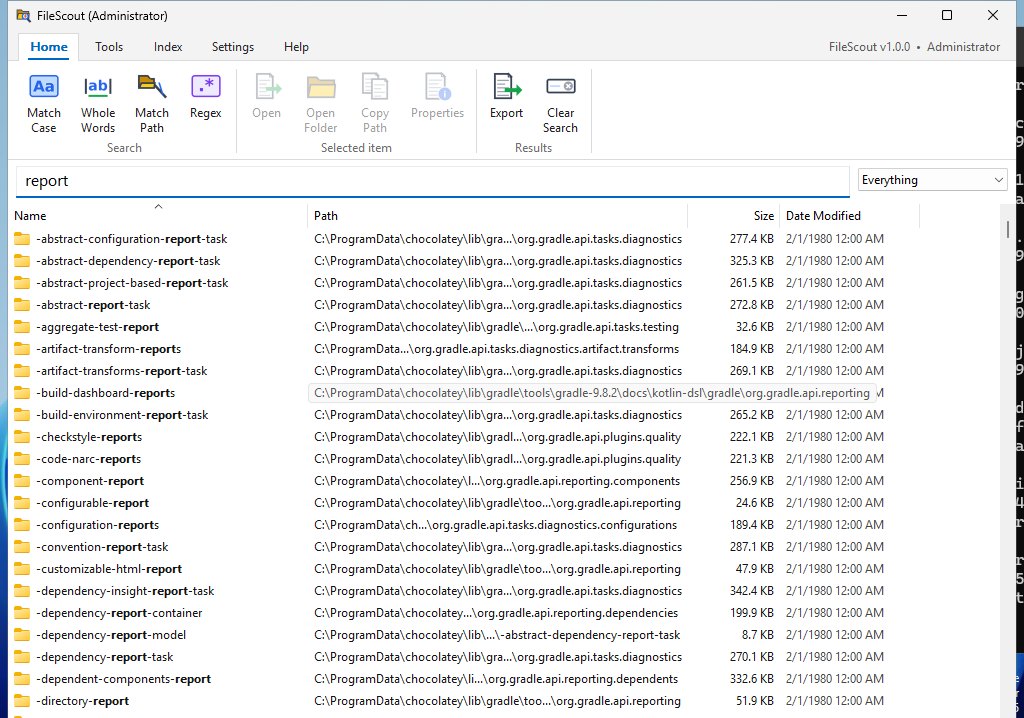
Find any file or folder on your PC by name, instantly. Type part of a name and every match on every drive appears as you type, already sorted, with the words you typed in bold. FileScout keeps up with every new, renamed and deleted file by itself, and shows the size of every folder.
What it does
"Where did I save that?" Answered before you finish typing.
Instant index
Reads each NTFS drive's file table straight off the disk, with several threads at once: 1.4 million files in about 10 seconds on our test PC. After that it starts in a tenth of a second.
Every CPU core
Each search is split across all of your PC's CPU threads, with a name scanner that checks 16 letters at a time. Results come out already sorted.
Live
New, renamed and deleted files appear and disappear within a quarter of a second, without losing your place in the list.
Every folder's size
The total size of everything inside every folder, always up to date. Largest Folders shows what's filling the drive.
Everything's search tricks
AND, OR, NOT, wildcards, ext:, size:, dates, paths, regex:: if you know Everything's search syntax, you already know FileScout's.
Find duplicates
dupe: finds names used more than once; sizedupe: finds files with exactly the same size, which are likely copies.
Ready-made searches
The Tools tab has Same Names, Same Size, Largest Files, Largest Folders, Recent Changes, Empty Folders and Most Opened.
Works like Explorer
Windows' own right-click menu, drag results into Explorer or an email, copy files or paths, Recycle Bin, Properties.
USB & network too
USB drives, memory cards and network shares are indexed by scanning and then watched for changes. Works without administrator rights too.
Always ready
Lives in the tray. Press Ctrl+Alt+F from anywhere to search. Starts with Windows if you like, with no permission box at sign-in.
Explains itself
A ribbon with color icons, and a plain-English tooltip on every button and setting. Every setting takes effect immediately.
Updates itself
Checks for a new version every 6 hours; one click downloads it, checks its SHA-256 fingerprint and restarts with your search.
Speed, measured
FileScout and Everything on the same PC.
Both were timed on the same Windows PC (a GitHub test server with 2 CPU threads and 1.4 million files), with Everything 1.4.1.1032. Both list the same 1.4 million files and folders. Everything's search times include a few milliseconds for its command-line helper, so they are approximate. FileScout uses every CPU thread, so on a typical 8- to 16-thread PC its lead on searches grows.
| What | Example | FileScout | Everything |
|---|---|---|---|
| Build the index from scratch | 1.4 million files | 10–12 s | 13–17 s |
| Start with the saved index | 0.1 s | — | |
| A word | report | 4 ms | 51 ms |
| Either word | honda|dealer | 4 ms | 99 ms |
| Part of a path | windows\system32 | 21 ms | 312 ms |
| Size | size:>100mb | 0.05 ms | 5 ms |
| Date | dm:last7days | 0.05 ms | 6 ms |
| Extensions | ext:jpg;png;heic | 7 ms | 11 ms |
| Regular expression | regex:^img_\d+\.jpg$ | 3 ms | 89 ms |
| One letter (1 million results) | e | 25 ms | 29 ms |
Run your own comparison: FileScout's Tools tab has a Speed Test.
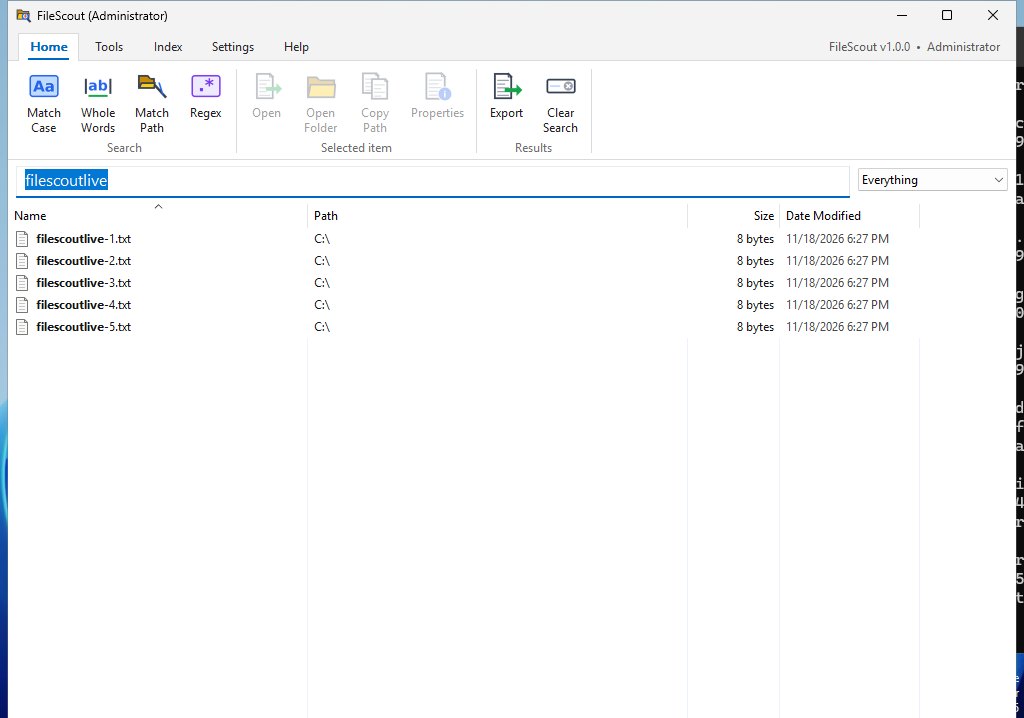
It stays live.
These five files were created while FileScout was showing the search. They appeared by themselves, and they disappear the same way when they're deleted. FileScout follows each drive's change journal four times a second.
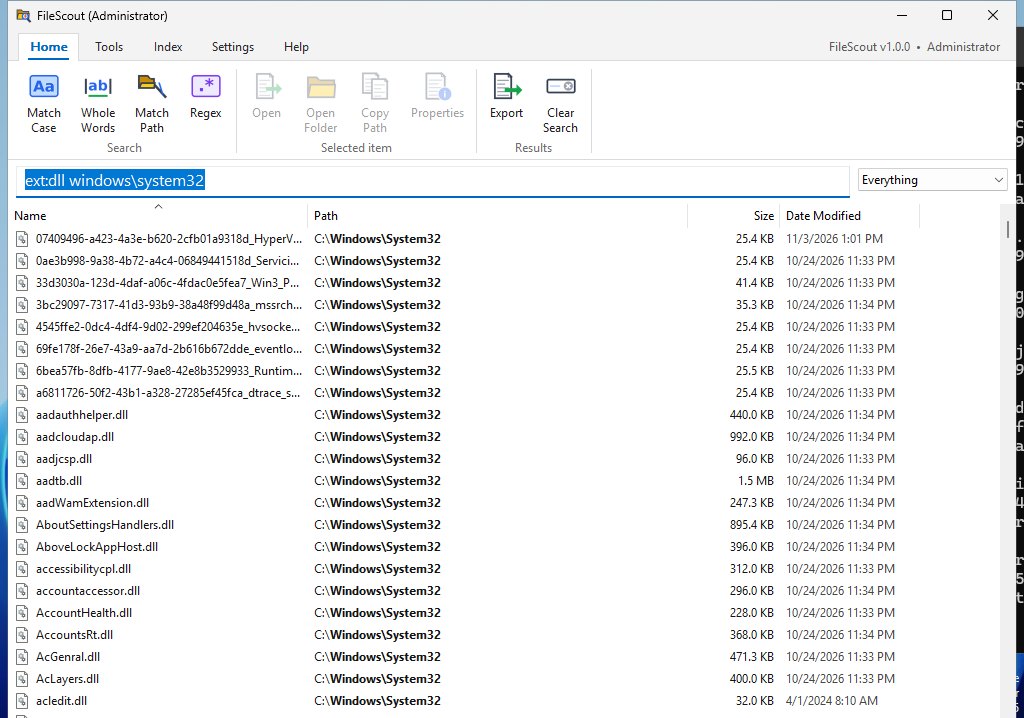
Search paths, not just names.
Put a backslash in a word and FileScout searches the whole path. ext:dll windows\system32 lists every DLL anywhere under System32, including Windows' hard-linked files, the same way Everything does.
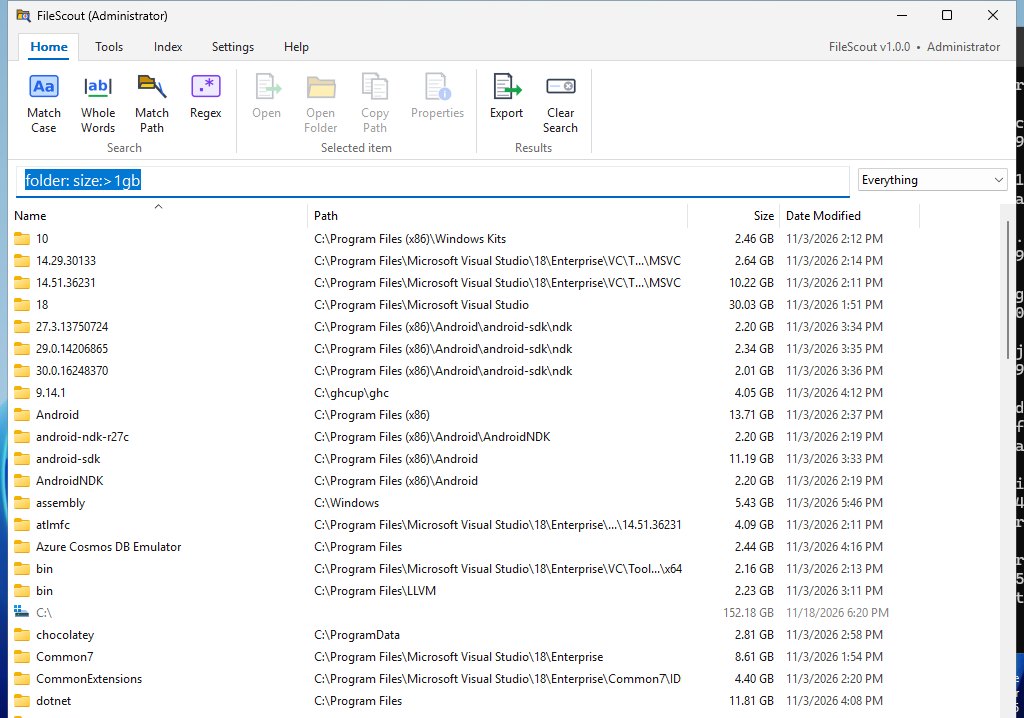
What's filling the drive?
Every folder shows the total size of everything inside it. folder: size:>1gb, or Tools › Largest Folders, finds the big ones in a fraction of a millisecond.
Search tricks
The same syntax as Everything.
| report 2025 | names with both words, in any order |
| jpg|png !temp | either word (OR) · leave out a word (NOT) |
| *.pdf ext:jpg;png | by extension |
| users\marc\ | anything under that path |
| size:>1gb size:huge | by size (folders too) |
| dm:today dm:last7days dc:2024 | by date modified or created |
| file: folder: parent:C:\Users | only files, only folders, only directly inside a folder |
| dupe: sizedupe: empty: | duplicate names, likely copies, empty folders |
| case: ww: regex: | match case, whole word, regular expression |
Get started
One file. Nothing to install.
- Windows 10 or 11, 64-bit.
- Installer (FileScout-Setup.exe): asks whether to install for just you (no administrator needed) or for everyone on the PC, and adds FileScout to the Start menu and Installed apps, with an uninstaller.
- Portable (FileScout.exe): save it anywhere (the Desktop or
C:\Tools; not Program Files, so it can update itself) and double-click it. Nothing to install. - For IT:
FileScout-Setup.exe /Sinstalls silently; add/ALLUSERS(as administrator) for everyone,/DESKTOPfor a Desktop shortcut,/NOUPDATESto switch off update checks. - Say Yes when Windows asks for administrator permission. That lets FileScout read each drive's file table directly, the fastest way. Say No and it still works, by scanning folders (slower the first time).
- The index is saved in your AppData folder when FileScout closes, so the next start is instant. It holds names, sizes and dates only, never file contents.
- Settings are kept in the Windows registry under your own account. Nothing about your PC is ever sent anywhere; the only internet use is checking GitHub for updates.
Seeing “Windows protected your PC”? New programs can trigger SmartScreen until they're widely downloaded: click More info → Run anyway. Only download FileScout from dialsoft.com or Dialsoft's GitHub page.
What's new
Release notes
Version 1.0.1 · November 18, 2026
- New: an installer, FileScout-Setup.exe. It asks whether to install for just you or for everyone, adds FileScout to the Start menu (and the Desktop if you like) and to Installed apps, with an uninstaller.
- Installed copies update themselves through the installer. The installer and uninstaller close a FileScout running in the tray by themselves.
- Uninstalling removes the start-with-Windows entry and the saved index, and asks before removing your settings.
- For IT: silent install with
/S, plus/ALLUSERS,/DESKTOPand/NOUPDATES.
Version 1.0.0 · November 18, 2026
- First release of FileScout: find any file or folder on your PC by name, instantly, as you type.
- Reads each NTFS drive's file table directly (with administrator rights), using several threads at once.
- Every search uses all of your PC's CPU threads; size and date searches jump straight to the right place in a ready-made sorted list.
- Live: new, renamed and deleted files, and every hard link, show up within a quarter of a second.
- Folder sizes for every folder, always up to date. The index is saved when FileScout closes, so the next start is instant.
- Everything-style search syntax, plus
dupe:,sizedupe:andempty:, and a Tools tab of ready-made searches. - Matches in bold, Windows' own right-click menu, drag results out, tray icon, hotkey (Ctrl+Alt+F), start with Windows, export (CSV / TXT / EFU), automatic updates.
FileScout updates itself: when a new version is out, a yellow bar appears with these notes and an Update now button.