
Windows tool · for IT technicians
AP Scout
Find the Wi-Fi access point that's dropping your connection, and understand why. AP Scout logs every drop and roam, checks the whole connection, explains problems in plain English, runs site surveys and audits the Wi-Fi setup against best practice. Built for techs who are still learning, and fast enough for those who aren't.

What it does
Everything you need to fix Wi-Fi on site.
Every AP, every MAC
All access points in range with BSSID, signal, rough distance, channel, width, Wi-Fi generation, security and load. SSIDs grouped by AP, with real names from your controller.
Which AP is dropping you
Every drop, roam and failed connect is logged against the AP it happened on, including Windows' own history from before AP Scout was running.
Plain-English diagnosis
Checks Wi-Fi, IP, gateway, internet and DNS in order, then says what's wrong, why, and exactly what to try. One click copies it all into a ticket.
Walk tests & site surveys
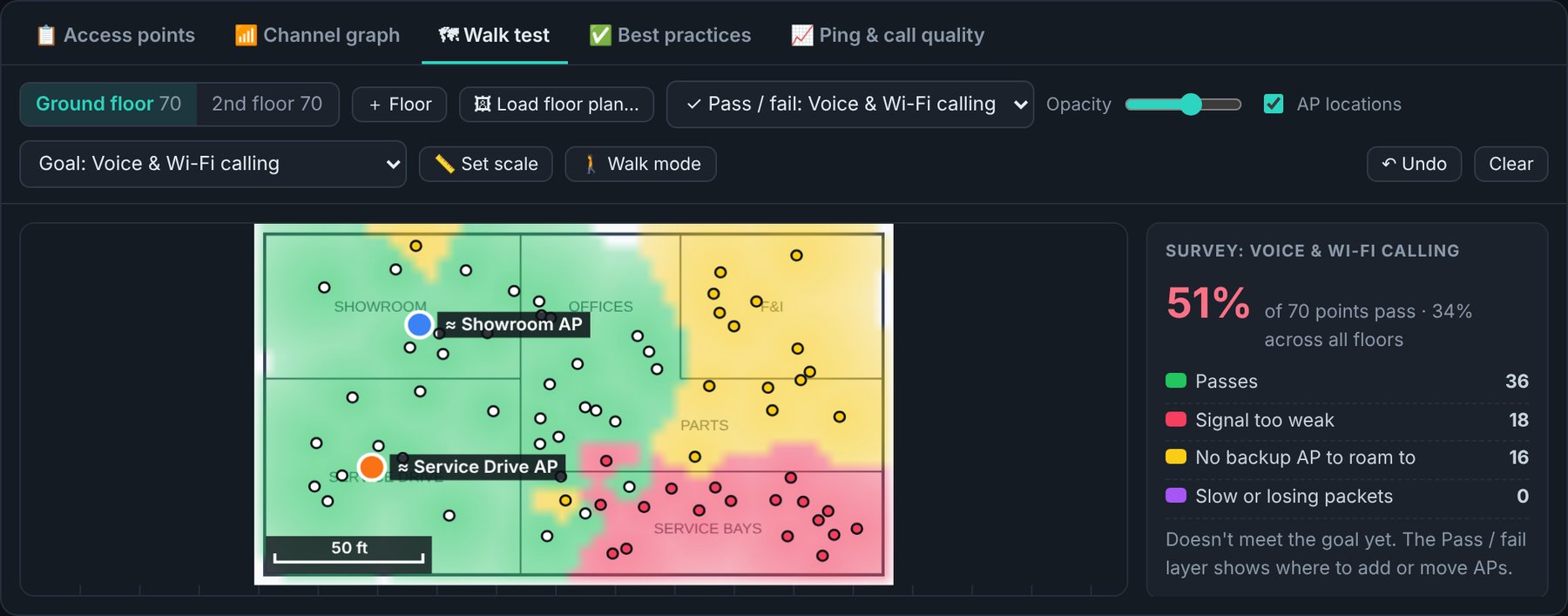
Load a floor plan, set the scale and walk. You get heatmaps, each AP's coverage, estimated AP locations, which floor each AP is on, and a pass/fail grade for voice or data.
Best-practice audit
Channels, widths, SSID count, fast roaming, security, power, minimum rates, guest isolation and firmware, each with why it matters and where to fix it.
UniFi & Meraki
Read-only connection to UniFi consoles and the Meraki dashboard: real AP names, VLANs, offline APs, firmware, channel load and floor plans.
Call quality
Live ping to the gateway and the internet with loss, jitter and a call-quality score, plus a roaming test that grades every handoff as you walk.
Client reports
A branded PDF with findings, survey maps, the best-practice review and drop history. Tech-only steps are left out of the client's copy.
Keeps itself current
One portable EXE, no installer. It checks for new versions, shows what's new, verifies the download's checksum and updates in seconds.
Know which AP to blame.
“The Wi-Fi keeps dropping” becomes “the F&I Offices AP dropped this laptop twice today at −77 dBm: it's at the edge of that AP's range.” Leave AP Scout in the tray on a user's laptop for a day and come back to the answer.

Survey the site. Grade it.
Walk mode takes a reading every 1.5 seconds as you walk. Pick the goal (voice, scanners and tablets, business data or guest) and every spot is graded: green passes, red is too weak, yellow has no backup AP to roam to, purple is slow.
Learn to do it right.
The best-practice audit checks the setup the way a senior wireless engineer would, and explains every rule. New techs learn why 2.4 GHz belongs on 1, 6 and 11 at 20 MHz, why guest Wi-Fi must be isolated, and what fast roaming does for phones.

Get started
Download, run, done.
- Windows 10 or 11, 64-bit, with Wi-Fi
- No installer, no admin rights
- Microsoft Edge WebView2 (built into Windows 11)
- Run it from the Desktop or
C:\Toolsso it can update itself - Windows 11: Location services on (Windows requires it to list Wi-Fi networks)
- Optional: UniFi or Meraki read-only access
Seeing “Windows protected your PC”? New programs can trigger SmartScreen until they're widely downloaded: click More info → Run anyway. Only download AP Scout from dialsoft.com.