
Windows 10 & 11 · SSDs, hard drives, USB flash drives & memory cards
DriveScope
Know a drive is good before you sell it. DriveScope reads each drive's health, measures its speed, catches counterfeit drives that lie about their size, erases them securely with a certificate, gets them ready for the buyer, and prints a test label on your Brother QL printer. Your Windows drive is locked so it can never be erased by accident.
What it does
Everything you need to test and resell a drive.
Health at a glance
Every S.M.A.R.T. value with a plain-English explanation, life remaining, hours, data written, temperature and the drive's own error log. Warns if a drive got worse during your tests.
Quick test in a minute
Health, read speed and 1,024 spots across the whole drive. Quick test + print label prints the sticker the moment it passes.
Catches fake drives
Counterfeit “2 TB” sticks that really hold 32 GB are caught in about a minute, without losing the data on the drive.
Benchmarks
CrystalDiskMark-style speeds compared with the drive's rating, a sustained-write graph that shows the cache and memory type, a surface graph, and a history per drive.
Docks & USB explained
Motherboard slot or USB dock? Names the dock's chip, what health data gets through, and compares the USB speed with what the drive and the port support.
What's inside
PCIe Gen3/4/5 or SATA III, M.2 keying and size, and the memory type (SLC, MLC, TLC, QLC) with its typical endurance.
What's on the drive
Every partition, even the ones Explorer hides (and why), the installed Windows or Linux version, the previous owner's user accounts, and the real BitLocker state.
Secure erase
Overwrite + verify, NVMe cryptographic erase and sanitize, SATA Secure Erase. Each ends with a printable erase certificate.
Prepare for sale
One step: wipes the partitions and formats as exFAT, NTFS or FAT32 with an automatic volume name and date.
Labels on a Brother QL
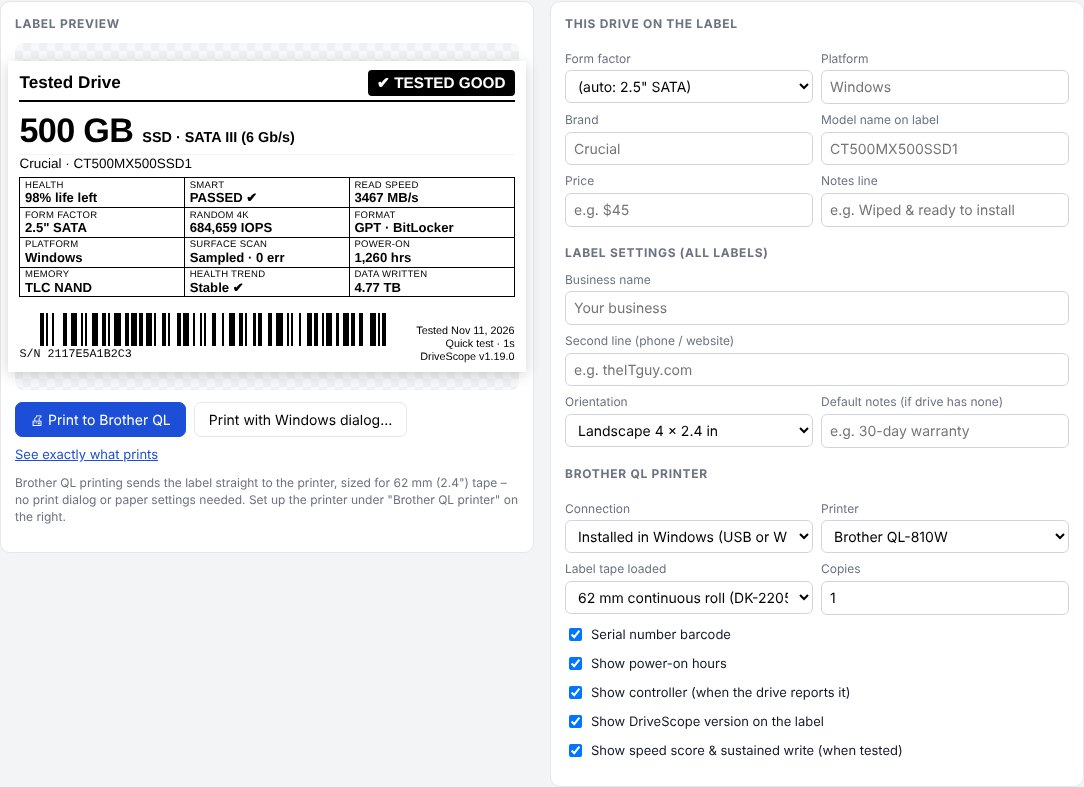
Capacity, generation, health, speeds and a serial barcode, printed straight to a Brother QL on 62 mm tape. No print dialog.
Safe by design
The boot drive is locked. Nothing ever defaults to disk 0. Every change re-checks the drive's identity and asks for the last 4 characters of its serial number.
Keeps itself current
Checks for new versions, shows what's new, verifies each download's checksum and updates itself, never in the middle of a test.
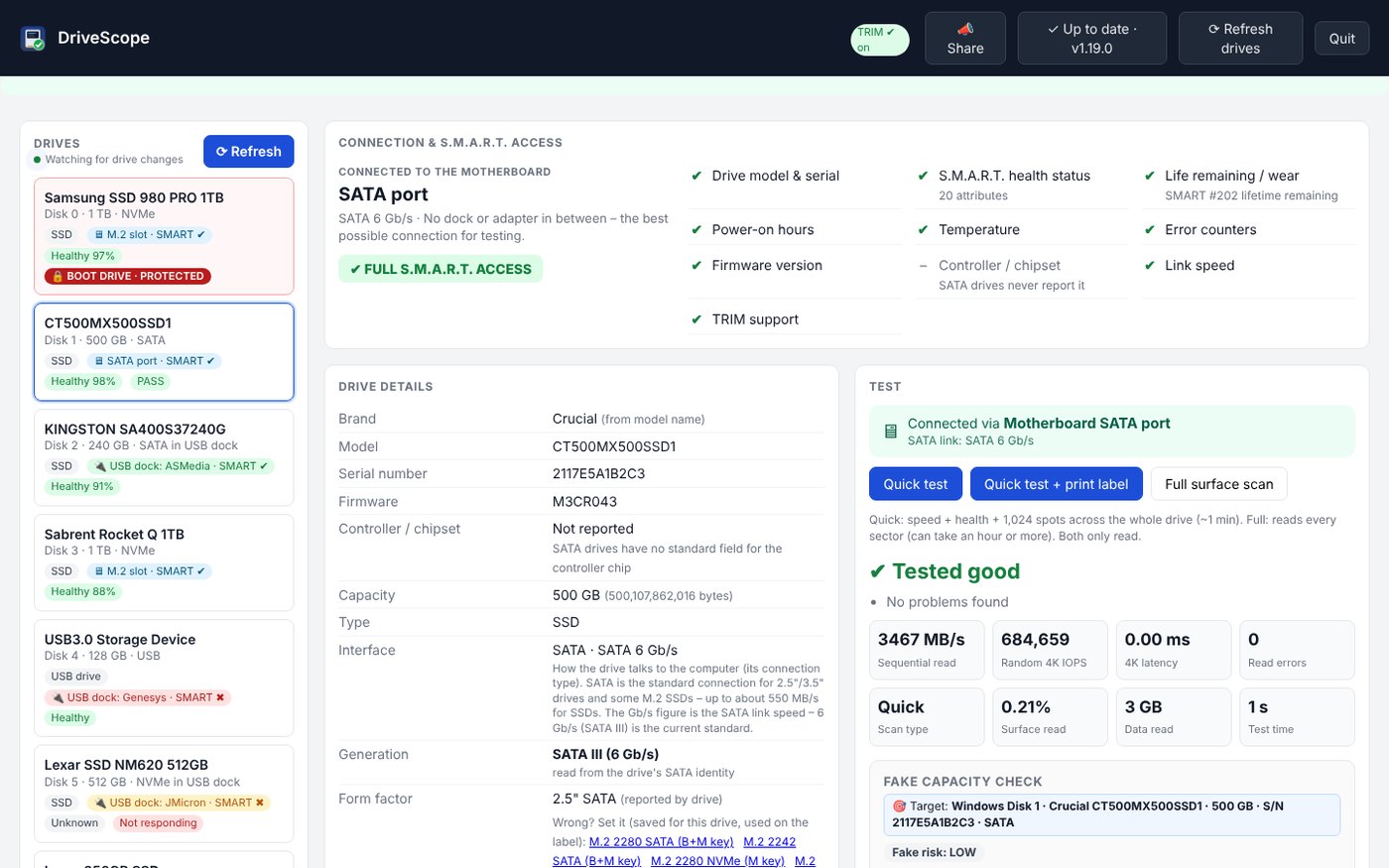
Every drive, one screen.
The list shows each drive's health, last result and how it's connected. Pick one to see its details and tests. Point at anything for an explanation.
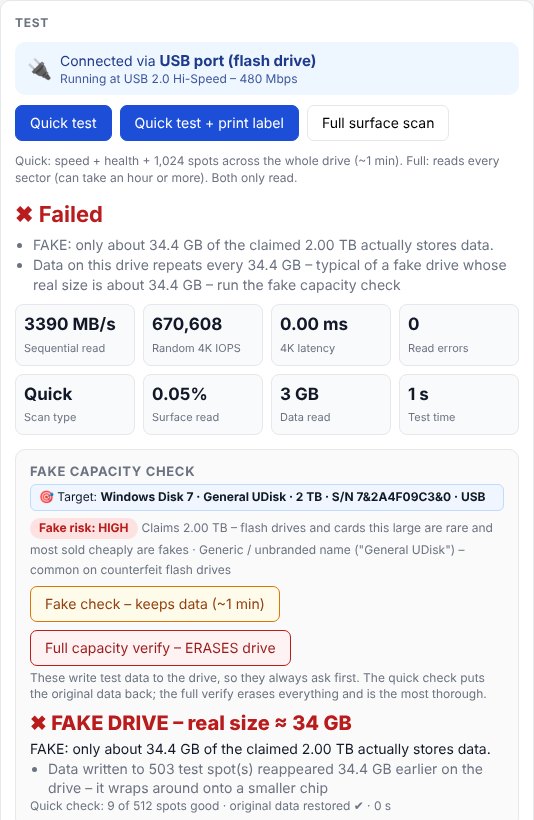
Fakes don't get past it.
The fake check writes to spots across the whole drive, reads them back and restores your data. A fake drive is flagged in red, and its label says so too.
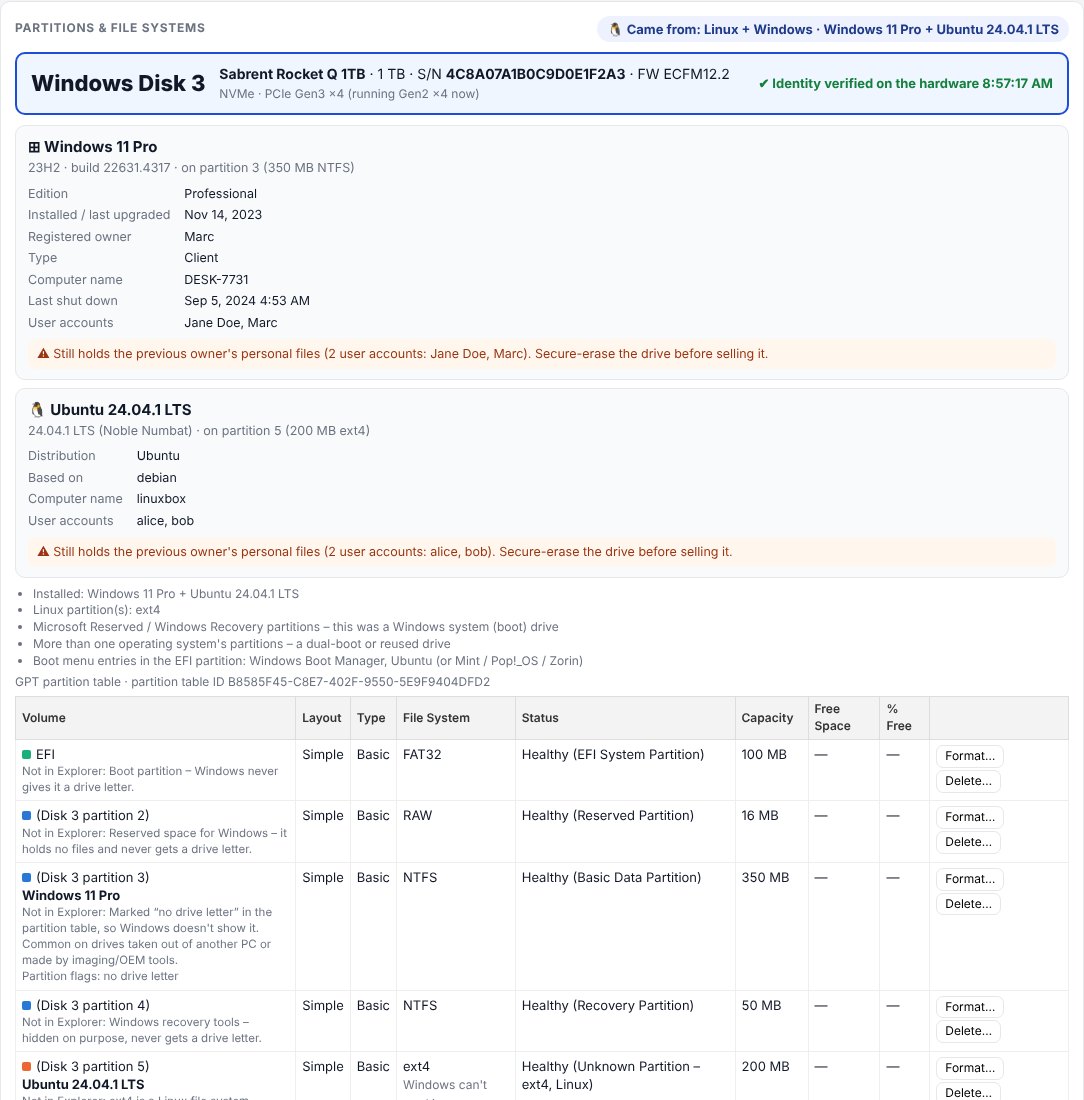
Who used it, and what's still on it.
DriveScope reads the files directly, without changing anything, and tells you which operating system is installed, the computer name and the previous owner's user accounts, so you know to erase it before selling.
Ready for the buyer.
Prepare for sale creates one partition and formats it with an automatic volume name like DriveScope11-11-26. The resale check confirms everything a buyer cares about, and the label prints on your Brother QL.
Get started
Installer or portable: your choice.
- Windows 10 or 11 (64-bit). DriveScope asks for administrator permission when it starts, because it reads drives directly.
- Installer (DriveScope-Setup.exe): Start menu and Desktop shortcuts, uninstall from Settings › Apps. No administrator password needed to install.
- Portable (DriveScope.exe): one file, nothing installed. Keep it in a folder you can write to so it can update itself.
- Opens in your web browser; keeps running in the system tray.
- Optional: a Brother QL label printer (QL-800, QL-810W, QL-820NWB…) with 62 mm tape, by USB, Wi-Fi or network.
- Best results with drives in a motherboard M.2 slot or SATA port; most USB docks work too.
Seeing “Windows protected your PC”? New programs can trigger SmartScreen until they're widely downloaded: click More info → Run anyway. Only download DriveScope from dialsoft.com or Dialsoft's GitHub page. Brand and model names belong to their owners; Brother and QL are trademarks of Brother Industries, Ltd.