
Windows 10 & 11 · portable
Print Scout
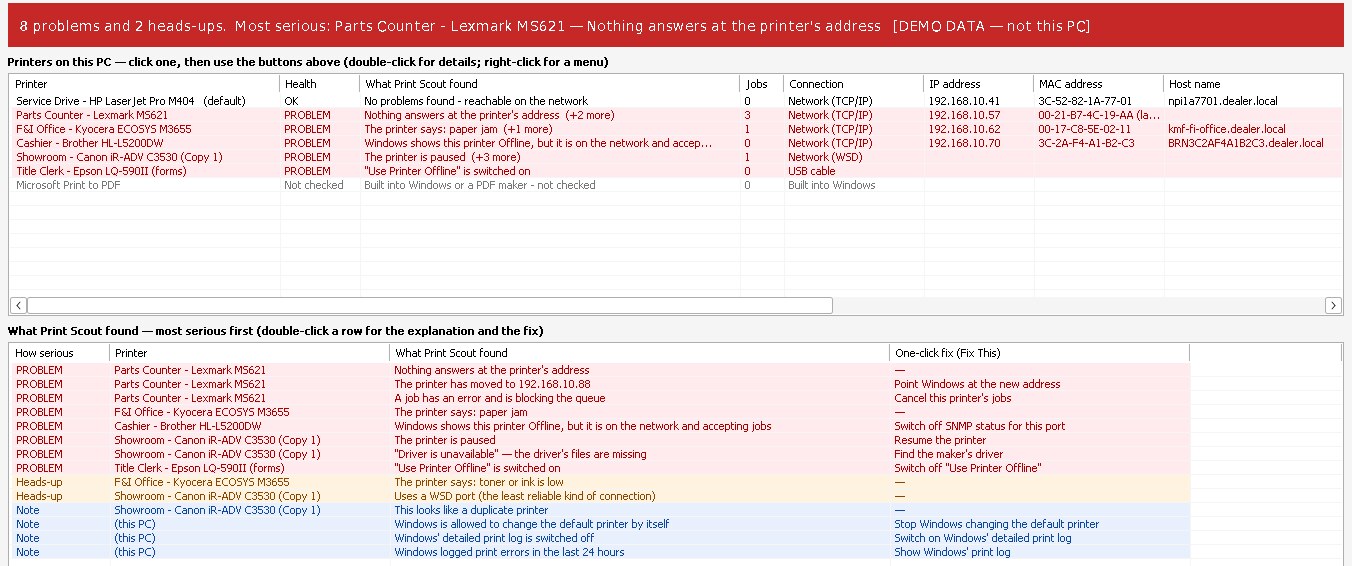
Find out why a printer won't print. Print Scout checks every link between the Print button and the paper: the Print Spooler, each printer, its stuck jobs, its driver and its network connection. It even asks the printer itself what is wrong. Then it explains the problem in plain English and fixes the common causes with one click.
What it does
"The printer's offline." Now you'll know why.
The whole printing chain
The Print Spooler service, every printer, every queue, every driver and every connection: USB, network address, WSD, or shared from another PC.
Fix This
Click a problem and Print Scout explains it the way you would to a new technician, then offers a safe one-click fix. You are always asked first.
Stuck jobs, cleared
Restart Spooler and Clear Stuck Jobs take care of the job that won't print and won't delete. Afterward Print Scout offers a test page to prove it's fixed.
Asks the printer itself
Pings each network printer, checks its print ports, and asks it over SNMP about paper jams, empty trays, open doors, toner levels and page count.
"Offline" that isn't
Spots the classic cause of a printer that shows Offline while it is plainly switched on (SNMP status on the port), and fixes it with one click.
Find Printers
Searches the network for every printer, installed or not, and lists each one's IP address, MAC address, host name, model and serial number.
Printers that moved
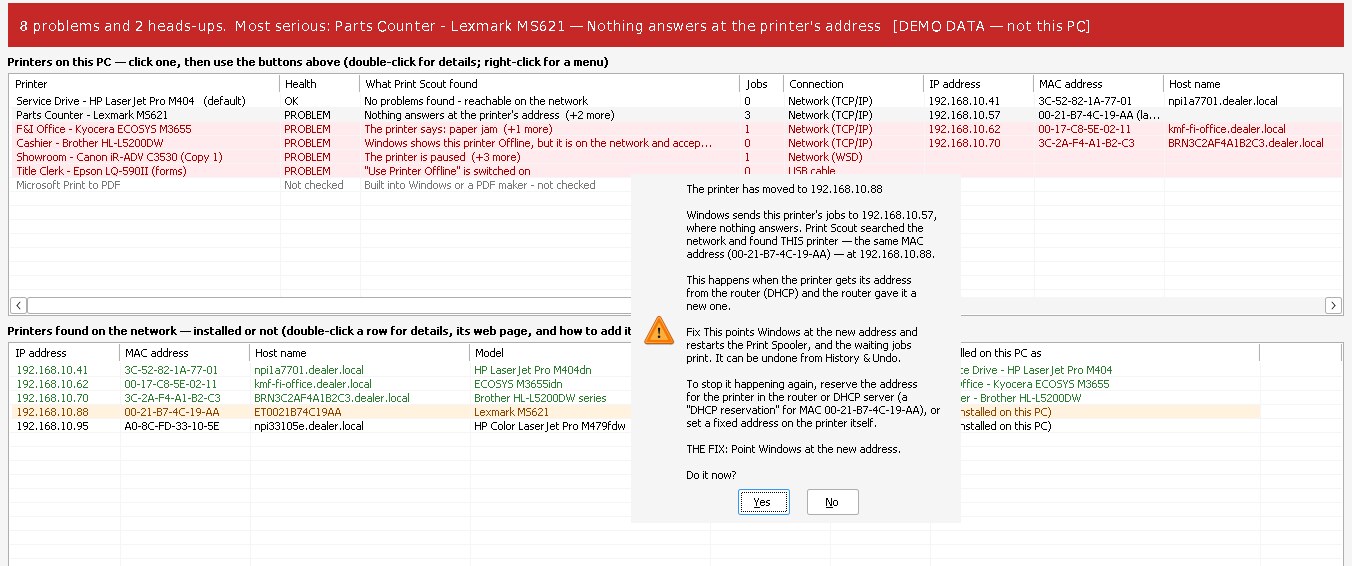
When the router hands a printer a new IP address, Print Scout recognizes it at the new address by its MAC address and points Windows there.
Driver answers
Every driver's maker, date, version and printer language. Catches "Driver is unavailable" and finds the right driver on the maker's own website.
Windows' own print logs
The print errors Windows recorded, plus the detailed log of every job, which Print Scout can switch on for printers that only fail now and then.
Made for remote support
Warns when it's running as SYSTEM from an RMM tool or ScreenConnect Backstage, which can't see the person's own printers.
History & Undo
Every change Print Scout makes is written down, and the switches it flips can be put back with one click.
Report for the ticket
Save a full report or copy a short summary to paste into a ticket, email or chat. Keeps a dated log, too.
Every printer on the network.
Find Printers lists every printer that answers: IP address, MAC address, host name, model, serial number, and which printer on this PC uses it. Installed ones are green. The amber one is a printer that moved.
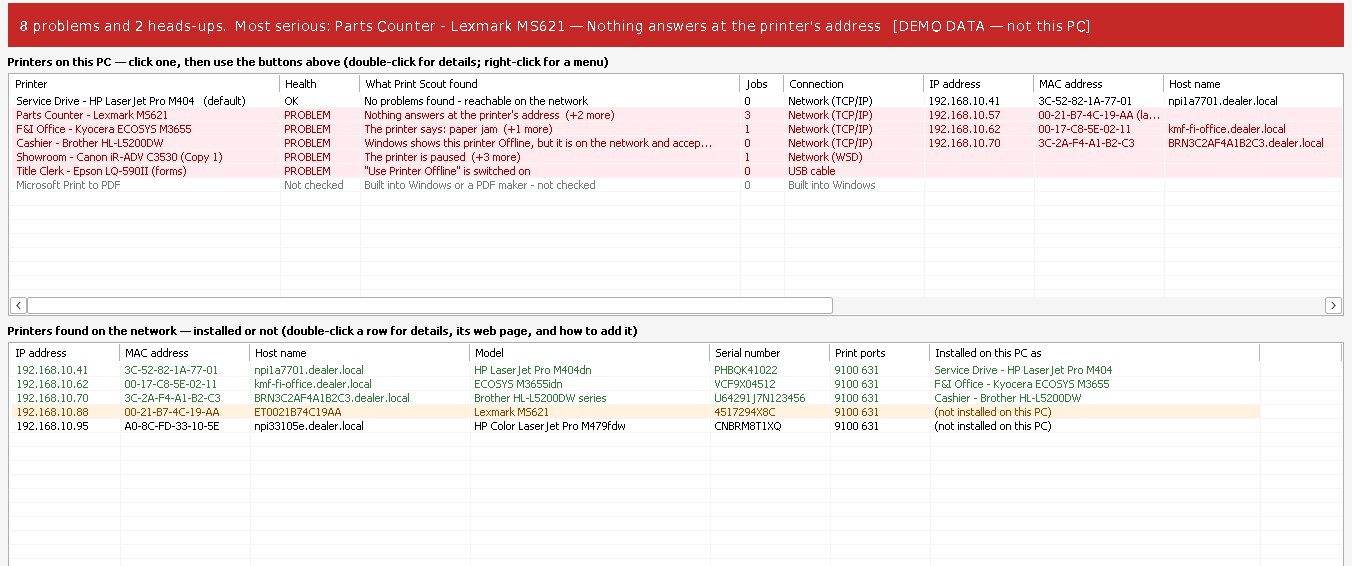
The printer moved. Print Scout found it.
Windows was still sending jobs to the old address. Print Scout recognized the same MAC address at a new one, explains what happened, and points Windows at the new address with one click. It also tells you how to stop it happening again.
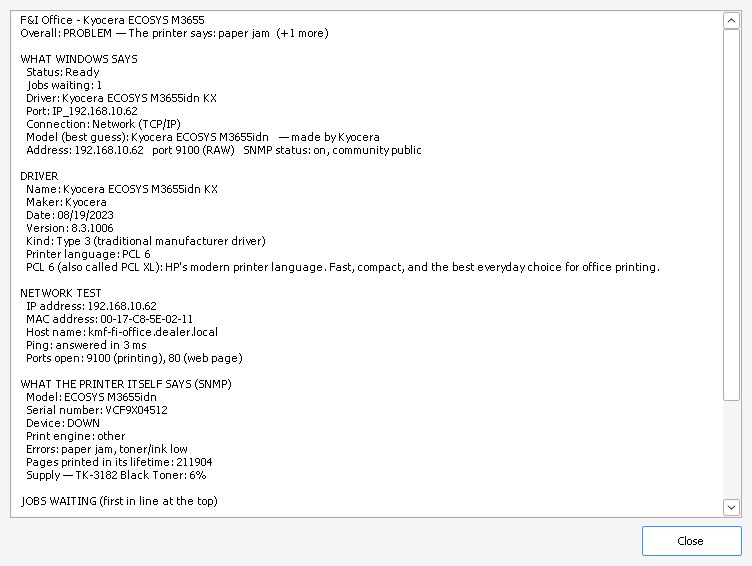
Everything about one printer.
What Windows says, the driver (maker, date, version, printer language), the network test, and what the printer itself reports: errors, toner level, serial number, lifetime pages.
Driver types, explained
PCL 6, PostScript, or something else?
A driver translates each page into a printer language. Print Scout shows which one every driver speaks, and its Help tab explains them all. The short version:
| Language | What it is | Use it for |
|---|---|---|
| PCL 6 | HP's modern printer language, understood by almost every office laser printer | Everyday office printing. Usually the best choice. |
| PCL 5 | The older HP language | Older programs, forms and check printing that need it |
| PostScript (PS) | Adobe's language; pages look the same on every printer | PDFs, graphics, Macs, layouts that must not shift |
| XPS / v4 | Microsoft's newer, simpler drivers | Easy installs, but often missing stapling, trays and codes |
| UFR II | Canon's own language | Canon imageRUNNER copiers only |
| Host-based (GDI) | The PC draws every page | Inexpensive printers; only the maker's exact driver works |
| ESC/P, ZPL | Dot-matrix and label printer languages | Multi-part forms, key tags and labels |

Get started
One file. Nothing to install.
- Windows 10 or 11, 64-bit.
- Run PrintScout.exe. It checks everything by itself and keeps checking every 10 seconds. Looking needs no special permission.
- When a fix needs administrator rights, Windows asks at that moment. Answer No and nothing changes.
- Run it on the person's own desktop, as them: printers that belong to a user are invisible to SYSTEM and other accounts.
- The network test and Find Printers only read from printers. Nothing is ever changed on a printer.
- Settings and the change history are kept in the Windows registry under your own account, and a dated log in your AppData folder. Nothing about the PC is sent anywhere.
Seeing “Windows protected your PC”? New programs can trigger SmartScreen until they're widely downloaded: click More info → Run anyway. Only download Print Scout from dialsoft.com or Dialsoft's GitHub page.
What's new
Release notes
Version 1.1.0 · November 17, 2026
- Every printer now shows its IP address, MAC address, host name and model, plus its driver's printer language, date and version.
- Find Printers: searches the network for every printer, installed or not.
- Printers that moved: recognized at their new address by MAC address or serial number, and Windows pointed there with one click.
- Catches "Driver is unavailable". Find Driver searches the maker's own website.
- Driver Types guide on the Help tab: PCL 6, PCL 5, PostScript, XPS/v4, UFR II, host-based, dot matrix and label printers.
- Windows' detailed print log: switched on with one click and shown alongside the errors.
- Warns when running as SYSTEM or as a different user than the person signed in.
- Offers a test page after Restart Spooler and Clear Stuck Jobs. New Devices & Printers and Add a Printer buttons.
Version 1.0.0 · November 17, 2026
- First release.
Print Scout updates itself: when a new version is out, a yellow bar appears with these notes and an Update now button.